With having to block Facebook at work due to overzealous users, I have now setup a twitter account. I know, I know who hasn't but anyway here is the address:
http://twitter.com/likuidkewl/
13.1.09


9.1.09
Newegg Eggsaver shipping - redux
Anyone who has ordered from Newegg.com knows that they sometimes offer free shipping with certain items. I suggest that, unless you have no urgent need for the item, you use UPS or FedEx to ship. The reason is that the Eggsaver shipping is provided by DHL and then handed off to the USPS for final delivery. This is common for small items such as Memory and processors. One major issue I had with this shipping method was that once it was handed off to the USPS DHL stopped reporting its progress, and it seemed that the Newegg shipping tracker didn't track it either. But, if you take your dhl tracking number and navigate your browser to http://webtrack.dhlglobalmail.com plug it in you will see the same information from Newegg but also a link to the USPS tracking number on the bottom right. Now at least you can tell when it arrives in your town.
HTH
HTH
30.12.08
Ubuntu 8.04 dbus and console kit crash
This has been happening randomly since our switch to the lovely Ubuntu server platform. The open bugs at launchpad were a good starting point for information.
What seems to be happening is that the dbus service is crashing and this is evident because the gnome-power-manager service is a screamer and depends on it, so after we restart dbus(#/etc/init.d/dbus restart) two instances of console-kit-daemon are running and fighting with each other for control.
The simple solution was to kill one of them:
$ps aux | grep console-kit-daemon and sudo kill xxxx
or use:
$pidof console-kit-daemon then pick one and kill it or script it to be killed.
We will see if this helps.....
What seems to be happening is that the dbus service is crashing and this is evident because the gnome-power-manager service is a screamer and depends on it, so after we restart dbus(#/etc/init.d/dbus restart) two instances of console-kit-daemon are running and fighting with each other for control.
The simple solution was to kill one of them:
$ps aux | grep console-kit-daemon and sudo kill xxxx
or use:
$pidof console-kit-daemon then pick one and kill it or script it to be killed.
We will see if this helps.....
29.12.08

16.12.08
Latest Midori on the Ubuntu Intrepid eee
If you are like myself and have installed Midori as your default browser in Intrepid you will want to add this PPA.
To do so open a terminal and type:
$sudo mousepad /etc/apt/sources.list
Scroll to the bottom paste in the above ppa save.
Update and upgrade and you have a much more stable Midori/Webkit
(Be warned with some issues with Google's use of java though)
deb http://ppa.launchpad.net/webkit-team/ubuntu intrepid main
deb-src http://ppa.launchpad.net/webkit-team/ubuntu intrepid main
To do so open a terminal and type:
$sudo mousepad /etc/apt/sources.list
Scroll to the bottom paste in the above ppa save.
Update and upgrade and you have a much more stable Midori/Webkit
(Be warned with some issues with Google's use of java though)
23.11.08
Installing Ubuntu 8.10 with Xfce4 on a Asus eee 700 2G Surf
Here I will cover the steps I used to get a cheapo Asus 2G Surf off of Xandros and on Ubuntu 8.10 with minimal system "sluggishness"
Download the Ubuntu 8.10 Intrepid Alternate installation CD from your closest/fastest mirror(IMPORTANT!)
Burn/Copy the ISO to a usable medium for the eee.
I used unetbootin to write the ISO to a 1GB Sandisk thumb drive from Linux, it should be the same using Windows.
Boot the eee using the usb flash drive by pressing esc during the POST process and choosing the medium you setup in the previous step.
When the Ubuntu(unetbootin) menu is displayed select "Text mode install" - This installs only the bare minimum of needed files leaving out the "fluff"
Partitioning:
I am going to say right now that some are not going to agree with my choices of file systems and/or partitions, but this is what worked the best for me and I am not to worried about that old 1GB SD card I barely ever use dying.
My layout is as follows:
Internal Solid State Disk -
/ ROOT is the entire 2GB of the SSD using EXT2
(This is a good idea in order to keep the non-replaceable SSD in good shape, you can read more about journaling file systems and the effect on solid state storage by doing a quick search of the web)
Additional SD card - This where we thrash away at a cheap 1GB SD card
/SWAP is 512 of the SD card (some say this is optional, I disagree)
/TMP is 256 of the SD card on the EXT3 file system (Journaling FS)
/HOME is the remainder of the SD card on EXT3 also
(I am religious in my backups so I am not worried about the SD card going kaput and losing my home directory. If you are not a backup person you may want to become one just in case or not keep anything super important on the eee.)
**I was plugged in to the Internet to get the latest updates and to make the most of my time**
Answer all the questions(...)
Follow all the prompts(...)
After the setup completes in about 45 minutes to an hour we can move on.
We are now going to install a kernel specifically designed for the Asus eee series of netbooks.
To install the new kernel follow the instructions at array.org
They are simple and concise.
Before I rebooted I removed the splash and quiet option from the grub boot options ($sudo vim /boot/grub/menu.lst) so I could see if any errors flew by, then rebooted ($sudo reboot).
Now you have a lean mean Ubuntu 8.10 install with a kernel designed for a eee pc, but we are not done yet.
$sudo aptitude install xfce4 gnome-power-manager
This will take a few minutes, I use the gnome power manager only because there is not a native Xfce program yet.
Keep your eyes here though it looks to be soon.
Now that Xfce is installed lets start it
$startx
**Note you will have to setup xfce to your liking and add the menu/applets of your choosing as it is barren**
A good place to start is here: http://www.xfce.org/about/tour
A quick setup for this tutorial:
Right click the panel(little grey area) and select "Customize Panel" under position select fixed position and in the drop down box select "Full Width" then "Close".
Right click an empty area of the panel and select "Add New Item" scroll down to the bottom and select "Xfce Menu" set it up to your liking and then do the same for "System Tray" and "Task List"(after you add this you will see the gpm and you can edit your settings from there)
If you have any real issues you cannot overcome leave a message here or fire off a quick search on the internet
Now lets install a web browser. Go to the XFCE menu -> Accessories -> Terminal
$sudo aptitude install midori
I like this browser due to the small footprint. Granted it is not as mature as Firefox, but it is webkit based and under heavy development(codeword for a little buggy). You may choose to install firefox instead for surefire compatibility but beware you _will_ notice the difference.
Remember we have not installed the default Xubuntu install so we have no login screen right now. If you feel you don't need one or you just want to show off in front of your friends leave it at the bash login and use startx. If not, you can choose to install GDM(since we met most of the dependencies with the power manager install) or use the old school login manager xdm(personal favorite)
#aptitude install xdm(optional)
Now we have a base system, power management and a login manager. All that is left is network management.
You can go for broke and install network manager, but I try to leave out as much gnome as possible. As such I install WICD
$sudo aptitude install wicd(optional)
Now just add your networks double check your power settings and go for gold!
I have found this setup to be fast and reliable, with some exception for minor Midori issues.
Have fun and feel free to leave any questions or comments you may have.
Download the Ubuntu 8.10 Intrepid Alternate installation CD from your closest/fastest mirror(IMPORTANT!)
Burn/Copy the ISO to a usable medium for the eee.
I used unetbootin to write the ISO to a 1GB Sandisk thumb drive from Linux, it should be the same using Windows.
Boot the eee using the usb flash drive by pressing esc during the POST process and choosing the medium you setup in the previous step.
When the Ubuntu(unetbootin) menu is displayed select "Text mode install" - This installs only the bare minimum of needed files leaving out the "fluff"
Partitioning:
I am going to say right now that some are not going to agree with my choices of file systems and/or partitions, but this is what worked the best for me and I am not to worried about that old 1GB SD card I barely ever use dying.
My layout is as follows:
Internal Solid State Disk -
/ ROOT is the entire 2GB of the SSD using EXT2
(This is a good idea in order to keep the non-replaceable SSD in good shape, you can read more about journaling file systems and the effect on solid state storage by doing a quick search of the web)
Additional SD card - This where we thrash away at a cheap 1GB SD card
/SWAP is 512 of the SD card (some say this is optional, I disagree)
/TMP is 256 of the SD card on the EXT3 file system (Journaling FS)
/HOME is the remainder of the SD card on EXT3 also
(I am religious in my backups so I am not worried about the SD card going kaput and losing my home directory. If you are not a backup person you may want to become one just in case or not keep anything super important on the eee.)
**I was plugged in to the Internet to get the latest updates and to make the most of my time**
Answer all the questions(...)
Follow all the prompts(...)
After the setup completes in about 45 minutes to an hour we can move on.
We are now going to install a kernel specifically designed for the Asus eee series of netbooks.
To install the new kernel follow the instructions at array.org
They are simple and concise.
Before I rebooted I removed the splash and quiet option from the grub boot options ($sudo vim /boot/grub/menu.lst) so I could see if any errors flew by, then rebooted ($sudo reboot).
Now you have a lean mean Ubuntu 8.10 install with a kernel designed for a eee pc, but we are not done yet.
$sudo aptitude install xfce4 gnome-power-manager
This will take a few minutes, I use the gnome power manager only because there is not a native Xfce program yet.
Keep your eyes here though it looks to be soon.
Now that Xfce is installed lets start it
$startx
**Note you will have to setup xfce to your liking and add the menu/applets of your choosing as it is barren**
A good place to start is here: http://www.xfce.org/about/tour
A quick setup for this tutorial:
Right click the panel(little grey area) and select "Customize Panel" under position select fixed position and in the drop down box select "Full Width" then "Close".
Right click an empty area of the panel and select "Add New Item" scroll down to the bottom and select "Xfce Menu" set it up to your liking and then do the same for "System Tray" and "Task List"(after you add this you will see the gpm and you can edit your settings from there)
If you have any real issues you cannot overcome leave a message here or fire off a quick search on the internet
Now lets install a web browser. Go to the XFCE menu -> Accessories -> Terminal
$sudo aptitude install midori
I like this browser due to the small footprint. Granted it is not as mature as Firefox, but it is webkit based and under heavy development(codeword for a little buggy). You may choose to install firefox instead for surefire compatibility but beware you _will_ notice the difference.
Remember we have not installed the default Xubuntu install so we have no login screen right now. If you feel you don't need one or you just want to show off in front of your friends leave it at the bash login and use startx. If not, you can choose to install GDM(since we met most of the dependencies with the power manager install) or use the old school login manager xdm(personal favorite)
#aptitude install xdm(optional)
Now we have a base system, power management and a login manager. All that is left is network management.
You can go for broke and install network manager, but I try to leave out as much gnome as possible. As such I install WICD
$sudo aptitude install wicd(optional)
Now just add your networks double check your power settings and go for gold!
I have found this setup to be fast and reliable, with some exception for minor Midori issues.
Have fun and feel free to leave any questions or comments you may have.
15.11.08
Acer Aspire One - Windows version, OOPS!
Behold the poster child for Linux on Netbooks.

This was shot at my local Staples on 15 November, 2008.
Here is a close up of the screen. I love the part about the CD-ROM.

*Sorry about the quality, it is a camera phone what can I say.
**And this display model is not for sale apparently

This was shot at my local Staples on 15 November, 2008.
Here is a close up of the screen. I love the part about the CD-ROM.

*Sorry about the quality, it is a camera phone what can I say.
**And this display model is not for sale apparently
8.11.08
Custom DrWeb CureIt utility -
As some may know I have switched to Linux for my everyday computing needs. This has left my "Storage" partition mostly untouched for months. Today I re-applied my 'Windows V!sta Business' Image to the Windows partition in order play around over the weekend.
While examining the Storage partition, mainly getting the needed security apps loaded on V!sta, I found a little script I wrote to deal with the DrWeb CureIt update issue(s).
Some may be curious as to what these "issues" are (IMO):
#1 You have to download the entire CureIt utility to have the most current virus definitions every time
#2 The ads that are packed with the program to buy Dr. Web are a bit over the top and annoy me
I understand this is a free tool and they need to make money, but I do believe they can do without my $20 for a spell.
Moving on, this is a simple batch file that can automate the process required to manually update the modified CureIt utility. In reality this is not "CureIt" but a modified version of the normally installable version which goes easily on a USB drive. I got the idea two years ago when CureIt first came out, the way it was packaged made me realize that DrWeb's main scanner didn't have to be installed to sniff out and destroy malware and off I went.
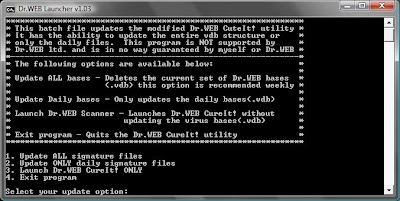
How this script works is simple, there is a zip file that has the needed files in it, simply extract and navigate to the DrWeb_USB folder and run Launch.bat. I have removed all the bases to save space in the download, so you will need to select option #1 the first time.
You may be able to swap out the Drweb32.exe for a newer version but this is not tested and is not supported(Much like the rest of this program). Do not try to use the .exe from the actual newer CureIt versions as Dr.Web has "fixed" it. If you would like to try a newer scanner version, use a installed version and the same goes for a newer .dll.
I do believed I tried this with more recent releases but it failed I think....
DISCLAIMER
If this somehow breaks your computer, which is highly unlikely, it is not my fault.
ALSO
If you feel like you are cheating the good Doctor please by all means buy a license and substitute that for the cureit.key. The only reason this is included is so that everyone can use it.
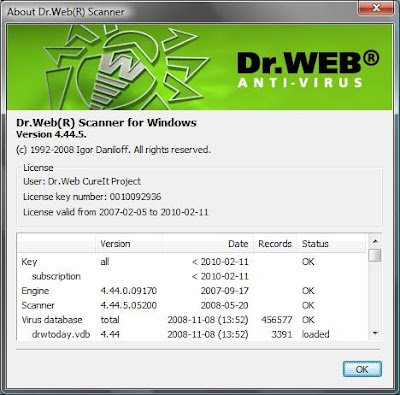
Below are two screen shots
CMD Windows options:
Driver Versions(note vdb's not included):
Here is the link to the zip file:
http://www.zer0-tec.net/files/DrWeb_USB.zip
//If this is illegal it will be promptly removed with word from DrWeb ltd.//
Dan
While examining the Storage partition, mainly getting the needed security apps loaded on V!sta, I found a little script I wrote to deal with the DrWeb CureIt update issue(s).
Some may be curious as to what these "issues" are (IMO):
#1 You have to download the entire CureIt utility to have the most current virus definitions every time
#2 The ads that are packed with the program to buy Dr. Web are a bit over the top and annoy me
I understand this is a free tool and they need to make money, but I do believe they can do without my $20 for a spell.
Moving on, this is a simple batch file that can automate the process required to manually update the modified CureIt utility. In reality this is not "CureIt" but a modified version of the normally installable version which goes easily on a USB drive. I got the idea two years ago when CureIt first came out, the way it was packaged made me realize that DrWeb's main scanner didn't have to be installed to sniff out and destroy malware and off I went.
How this script works is simple, there is a zip file that has the needed files in it, simply extract and navigate to the DrWeb_USB folder and run Launch.bat. I have removed all the bases to save space in the download, so you will need to select option #1 the first time.
You may be able to swap out the Drweb32.exe for a newer version but this is not tested and is not supported(Much like the rest of this program). Do not try to use the .exe from the actual newer CureIt versions as Dr.Web has "fixed" it. If you would like to try a newer scanner version, use a installed version and the same goes for a newer .dll.
I do believed I tried this with more recent releases but it failed I think....
DISCLAIMER
If this somehow breaks your computer, which is highly unlikely, it is not my fault.
ALSO
If you feel like you are cheating the good Doctor please by all means buy a license and substitute that for the cureit.key. The only reason this is included is so that everyone can use it.
Below are two screen shots
CMD Windows options:

Driver Versions(note vdb's not included):

Here is the link to the zip file:
http://www.zer0-tec.net/files/DrWeb_USB.zip
//If this is illegal it will be promptly removed with word from DrWeb ltd.//
Dan
30.10.08
Ubuntu 8.10 Released.. With issues...
I think I am just p-o'd that Canonical released Ubuntu 8.10 with a bug that affects me in a major way. This one:
https://bugs.launchpad.net/ubuntu/+source/linux/+bug/264789
How can you release a distribution this day in age and have severe issues with USB storage of all things? UGH!
https://bugs.launchpad.net/ubuntu/+source/linux/+bug/264789
How can you release a distribution this day in age and have severe issues with USB storage of all things? UGH!
27.10.08
Dropped the Tomato....
Well it was a nice run but it seems that the Tomato Firmware series of old has gone and all that is left are the remnants of what was once great.
Some may say "Wait Tomato still R0X!" But I am sorry my friends, it does so no longer. I feel that ever since the 1.07 version things have gone steadily downhill. Jon _has_ given out the code and others _have_ tried to improve the issues that arise, kudos to them. But when a router locks because someone is using a Intel Wireless card on a client machine this is by far unacceptable. It saddens me to say that this issue has been known and still remains. Do not think that I don't appreciate all the work that went into this project because I do, I am very grateful. But how does something like this go on for months?
As such I have switched from Tomato to DD-WRT v24-sp1, as of this posting I am up over 8 days and no lockups. Where as with Tomato I would have had to reboot 2-3 times already.
Again, thanks Jon for the time and effort. No ill will is intended in this posting.
Some may say "Wait Tomato still R0X!" But I am sorry my friends, it does so no longer. I feel that ever since the 1.07 version things have gone steadily downhill. Jon _has_ given out the code and others _have_ tried to improve the issues that arise, kudos to them. But when a router locks because someone is using a Intel Wireless card on a client machine this is by far unacceptable. It saddens me to say that this issue has been known and still remains. Do not think that I don't appreciate all the work that went into this project because I do, I am very grateful. But how does something like this go on for months?
As such I have switched from Tomato to DD-WRT v24-sp1, as of this posting I am up over 8 days and no lockups. Where as with Tomato I would have had to reboot 2-3 times already.
Again, thanks Jon for the time and effort. No ill will is intended in this posting.
22.10.08

17.10.08
The 'e1000 nasty' firmware fix announced via Suse
For those affected, there has been a message sent to the lkml in regards to fixing corrupted firmware.
See here:
http://lkml.org/lkml/2008/10/17/214
See here:
http://lkml.org/lkml/2008/10/17/214
8.10.08
Thanks again Microsoft!
As some of you know, well if you read this blog that is, over the last year or so I have switched 98% of my computing to Linux. There does however seem to be something around every two weeks that requires me to use Windows and today was one of those days.
Below you will find what I was greeted with this morning. All I have to say is "Thanks again Microsoft" this time you have proven it is not only third party vendors who like to crash and lockup the computer. FANTASTIC!!

And just in case you are wondering what I was doing to have this happen the answer is nothing, it looks like AU went off and BLAM! There goes the OS.
Userspace "What is that!"
UGH!
Below you will find what I was greeted with this morning. All I have to say is "Thanks again Microsoft" this time you have proven it is not only third party vendors who like to crash and lockup the computer. FANTASTIC!!

And just in case you are wondering what I was doing to have this happen the answer is nothing, it looks like AU went off and BLAM! There goes the OS.
Userspace "What is that!"
UGH!
15.9.08
Washington Post's "Underscore for Emphasis"
It seems even the Washington Post is now a fan of the "Underscore for Emphasis" campaign:
Here

However, the NTSB contradicted Metrolink's report. Higgins said that the dispatcher noticed something was wrong, but before he could contact the train, the conductor _ who survived _ called in to report the wreck.Was visible at: 1254 EST
Here

6.9.08
gnu Wallpaper
Simple gnu wallpaper created with gimp.
It is the gnu Alternate logo and a simple black background designed to allow ample space for conky monitoring.
It is 1280x800 and is covered by GPLv3.

Added:

It is the gnu Alternate logo and a simple black background designed to allow ample space for conky monitoring.
It is 1280x800 and is covered by GPLv3.

Added:

7.8.08
Some Xubuntu (Xfce) tweaks
I have been using Xubuntu for around a month now on my ThinkPad and thought I would share some of the tweaks/fixes I use.
This is a very tip of the iceberg post so if you have questions please fell free to ask.
Xubuntu install "must haves" -
Aptitude install the following(keep in mind this is my notebook)
Powertop, ACPItool, htop, rar, OOo Writer, xubuntu-restricted-extras
Fixes:
Mount NTFS drives at boot
Create mount point and place it in /media
ex. sudo mkdir /media/yourMount
List partitions with 'sudo fdisk -l' select the partition to mount
ex. /dev/sda5 5100 9729 37187608+ 7 HPFS/NTFS
Edit /etc/fstab as super user and add lines for your ntfs partion(s)
/dev/sda5 /media/yourMount ntfs-3g defaults,umask=007,gid=46 0 1
Reboot or mount -a
Unbind Windows key as a modifier
Create a file called .Xmodmap in your home directory.
vim .Xmodmap
Add this line:
remove mod4 = Super_L
*Same applies for Super_R also if you have it.
Go to Settings -> Settings Manager -> Keyboard -> Shortcuts tab
Create a new "Theme" Give it a name and and now map the Super_L to the shortcut of your liking. I use it for a Terminal.
-----------------------------------------------------------------------------------------------------
If I get some more time I will put up some more information.
--Dan
This is a very tip of the iceberg post so if you have questions please fell free to ask.
Xubuntu install "must haves" -
Aptitude install the following(keep in mind this is my notebook)
Powertop, ACPItool, htop, rar, OOo Writer, xubuntu-restricted-extras
Fixes:
Mount NTFS drives at boot
Create mount point and place it in /media
ex. sudo mkdir /media/yourMount
List partitions with 'sudo fdisk -l' select the partition to mount
ex. /dev/sda5 5100 9729 37187608+ 7 HPFS/NTFS
Edit /etc/fstab as super user and add lines for your ntfs partion(s)
/dev/sda5 /media/yourMount ntfs-3g defaults,umask=007,gid=46 0 1
Reboot or mount -a
Unbind Windows key as a modifier
Create a file called .Xmodmap in your home directory.
vim .Xmodmap
Add this line:
remove mod4 = Super_L
*Same applies for Super_R also if you have it.
Go to Settings -> Settings Manager -> Keyboard -> Shortcuts tab
Create a new "Theme" Give it a name and and now map the Super_L to the shortcut of your liking. I use it for a Terminal.
-----------------------------------------------------------------------------------------------------
If I get some more time I will put up some more information.
--Dan
2.7.08
Pidgin 2.4.3 released - Fixes ICQ issue
Great job to the Pidgin maintainers for a quick response to the ICQ issues reported yesterday.
Downloads for version 2.4.3 are available @ http://www.Pidgin.im
Downloads for version 2.4.3 are available @ http://www.Pidgin.im
1.7.08
ICQ users left in the dark
As is being reported around the net 3rd party ICQ clients Pidgin and Kopete are are stuck ICQ-less until patches get merged into the systems. Pidgin is affected in the Linux and Windows world, fixes are available but to my knowledge these are only temporary or proposed and not anything official.
Ubuntu temp fixes: https://bugs.launchpad.net/ubuntu/+source/pidgin/+bug/244591
Windows temp fixes: http://developer.pidgin.im/attachment/ticket/6220/liboscar.zip
You have to love unannounced protocol changes! :)
Ubuntu temp fixes: https://bugs.launchpad.net/ubuntu/+source/pidgin/+bug/244591
Windows temp fixes: http://developer.pidgin.im/attachment/ticket/6220/liboscar.zip
You have to love unannounced protocol changes! :)
19.6.08
Who says Microsoft filesystems are "dirty"?
Below is a screen shot of one of the computers we have at work. Needless to say it was in need of a minor disk cleanup / defrag.


7.6.08
Linux Power information
Striving to be Green is great, running Green in the Linux world is a bit of a hassle but can be done.
I don't have the time to explain in great detail, but I am going to provide some links to help you on your quest for a "Greener Linux"
Great write up on the usage of CPU-Freq utils:
http://polishlinux.org/linux/debian/green-pcs-cpu-frequency-scaling-in-linux/
Thinkpad Linux mailing list- An valuable resource for those with Thinkpads / Ideapads && Linux
http://mailman.linux-thinkpad.org/mailman/listinfo/linux-thinkpad
Thinkwiki - Another great resource for Lenovo/IBM notebooks and Linux:
http://www.thinkwiki.org/wiki/ThinkWiki
Less Watts - Saving power with Linux and Intel:
http://www.lesswatts.org/
PowerTop Mailing List:
http://www.bughost.org/mailman/listinfo/power
Hopefully those links will keep you busy for a bit and help you reduce YOUR footprint on the world...
I don't have the time to explain in great detail, but I am going to provide some links to help you on your quest for a "Greener Linux"
Great write up on the usage of CPU-Freq utils:
http://polishlinux.org/linux/debian/green-pcs-cpu-frequency-scaling-in-linux/
Thinkpad Linux mailing list- An valuable resource for those with Thinkpads / Ideapads && Linux
http://mailman.linux-thinkpad.org/mailman/listinfo/linux-thinkpad
Thinkwiki - Another great resource for Lenovo/IBM notebooks and Linux:
http://www.thinkwiki.org/wiki/ThinkWiki
Less Watts - Saving power with Linux and Intel:
http://www.lesswatts.org/
PowerTop Mailing List:
http://www.bughost.org/mailman/listinfo/power
Hopefully those links will keep you busy for a bit and help you reduce YOUR footprint on the world...
Subscribe to:
Posts (Atom)